
CDN traffic is created when Plytix-hosted images or files are loaded, downloaded, or transferred by an external website, ecommerce platform, or tool.
For most customers, CDN traffic will not affect pricing. It usually only becomes something to monitor if your team uses Plytix-hosted assets heavily outside Plytix.
This does not usually include everyday work inside Plytix, such as viewing, previewing, editing, or downloading assets from Plytix.
This article explains what usually counts toward CDN traffic, what usually does not, how credits work, and how to reduce traffic usage if needed.
Understanding CDN traffic in Plytix
Understanding CDN traffic and pricing
What does not count toward CDN traffic
What counts toward CDN traffic
How to reduce CDN traffic usage
Diagnosing high CDN traffic usage
*Skip to any section in this article by clicking on the links above
Understanding CDN traffic in Plytix
A CDN is the system that delivers publicly accessible files from servers located closer to the person or system requesting them.
In Plytix, that usually means assets like product images are delivered through the CDN when they are accessed outside the platform. This helps make asset delivery faster and more reliable.
When CDN traffic matters
CDN traffic is usually only important to monitor when assets are being loaded or transferred outside Plytix at scale.
You may want to review your CDN traffic if:
- you embed Plytix image URLs directly on your website
- you sync large numbers of images to Shopify, BigCommerce, or another ecommerce platform
- you use the Plytix API to pull assets into external systems
- your website or catalog has high traffic
- your account settings show CDN usage increasing quickly
If your team mostly views, edits, previews, or downloads assets inside the Plytix PIM, CDN traffic is unlikely to be a major concern.
Checking CDN usage in your PIM
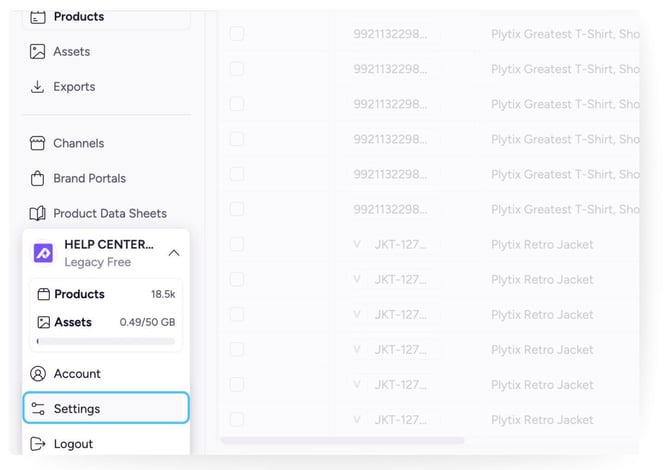
You can review your CDN traffic limits and usage in Plytix Account Settings under Info and Traffic.
1. Click your profile picture in the bottom-left corner of Plytix, then select Settings.
2. Review your current usage information in the Info and Traffic sections of your Plytix Account Settings.
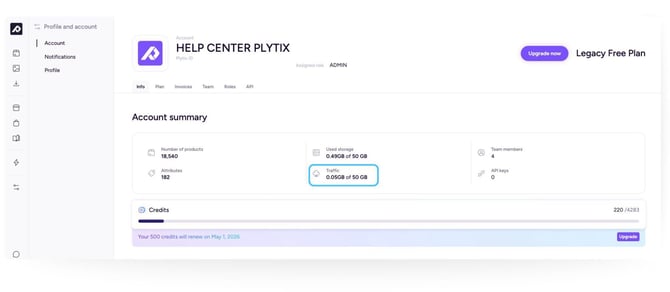
If your team expects heavy external asset traffic, it is worth reviewing this regularly so you can understand traffic patterns and avoid surprises.
Measuring CDN traffic
CDN usage is measured in gigabytes transferred.
Every time a Plytix-hosted image or file is loaded by an external website, ecommerce platform, or tool, the size of that file contributes to CDN traffic. If the same file is loaded many times, that traffic is counted many times.
For example, if a 1 MB image is loaded 1,000 times externally, that creates roughly 1 GB of CDN traffic.
Traffic usage resets each month based on your billing date.
Understanding CDN traffic and pricing
CDN traffic becomes relevant for pricing if your account goes above the CDN traffic allowance included in your plan.
If your CDN traffic goes above your included allowance, extra usage will consume credits at the following rate:
1 GB of CDN traffic = 5 credits
If your credits run out, CDN delivery will pause until your credits reset on your billing date.
Traffic usage resets each month based on your billing date.
For many customers, this will not become a major issue. It matters most for businesses with high-volume external asset delivery, frequent image syncs, or public websites that load Plytix image URLs directly.
What does not count toward CDN traffic
These actions usually do not count toward CDN traffic because they happen inside Plytix or use standard Plytix download flows:
- viewing assets inside Plytix
- previewing assets inside Plytix
- downloading assets directly inside Plytix
- downloading assets from a Plytix Brand Portal
⚠️ Downloading from a Plytix Brand Portal with a resize transformation applied at download time can count toward CDN usage
What counts toward CDN traffic
Website embeds using Plytix image URLs
If you use Plytix image URLs directly on your website, CDN traffic is created each time those images load for visitors. This can add up quickly on high-traffic websites.
Syncing changed images to Shopify or BigCommerce
Image syncs to platforms like Shopify and BigCommerce can consume CDN traffic when files are transferred. If an image changes and gets pushed again, that transfer counts.
Pulling assets into an external server
If you fetch assets from Plytix into your own server, DAM, or another external system, the asset transfer counts toward CDN usage.
Third-party apps loading asset URLs through the Plytix API
If a third-party app receives Plytix asset URLs through the Plytix API and then loads those files outside Plytix, that usage can also consume CDN traffic.
For example, if your website gets 20,000 visits per month and each visit loads 10 Plytix-hosted images, that creates 200,000 external image loads. If those images are large, CDN usage can increase quickly.
How to reduce CDN usage
The best way to lower CDN traffic usage is to reduce how much data gets transferred when assets are loaded outside Plytix.
Resize assets before delivery
Resized asset delivery using Plytix Channel rules can reduce traffic usage because smaller files mean less data is transferred.
Avoid serving oversized images
If your website or external system only needs a smaller image, avoid delivering the original full-resolution file.
Reduce unnecessary sync frequency
If you are syncing your whole catalog frequently, review whether that cadence is really needed. Fewer large syncs can reduce traffic usage.
Only update changed files
If possible, avoid re-sending assets that have not changed.
Check external tools and scripts
Review whether any external apps, scripts, or integrations are repeatedly loading the same Plytix asset URLs.
| Scenarios |
Counts toward CDN traffic? | Notes |
| Viewing assets in Plytix | No | Internal platform usage |
| Previewing assets in Plytix | No | Internal platform usage |
| Downloading assets in Plytix | No | Internal platform usage |
|
Standard Plytix Brand Portal downloads |
No | Typically treated as signed/internal delivery |
| Plytix Brand Portal downloads with resize | Yes | Resize at download can count |
|
Website embeds using Plytix image URLs |
Yes |
Every external load counts |
| Syncing changed images to Shopify or BigCommerce | Yes |
Transfer is counted |
| Pulling assets into external systems | Yes | Each file transfer counts |
| Third-party app loading asset URLs through the Plytix API | Yes | External usage counts |
| Resized asset delivery using Plytix Channel rules |
Reduced |
Smaller file means less transfer |
Diagnosing high CDN usage
If your account is using more CDN traffic than expected, start by checking these areas:
1. Website embeds
Check whether your website is serving images directly from Plytix image URLs. If it is, each page visit can trigger CDN traffic for every image loaded.
2. Ecommerce syncs
Review how often changed images are being pushed to Shopify, BigCommerce, or other ecommerce platforms. Repeatedly syncing large numbers of images can increase CDN traffic usage.
3. External integrations
Look for apps, scripts, servers, or integrations that may be repeatedly loading Plytix asset URLs through the Plytix API.
Frequently Asked Questions
What does CDN stand for?
CDN stands for Content Delivery Network.
What is CDN traffic in Plytix?
CDN traffic is created when Plytix-hosted images or files are loaded, downloaded, or transferred by an external website, ecommerce platform, or tool.
For example, this can happen when a product image from Plytix loads on your website, when changed images are synced to Shopify or BigCommerce, or when another tool pulls files from Plytix.
Does CDN usage affect pricing?
For most customers, CDN traffic will not affect pricing. It only becomes relevant for pricing if your CDN traffic goes above the allowance included in your plan.
What happens if I go over my included CDN traffic allowance?
If your CDN traffic goes above your included allowance, extra usage will consume credits at 1 GB = 5 credits.
If your credits run out, external CDN delivery will pause until your credits reset on your billing date or you buy additional credits.
This means Plytix-hosted assets may no longer load on external websites, ecommerce platforms, or third-party systems. In most cases, images simply will not render, but the exact experience depends on where the assets are being displayed.
This does not affect everyday work inside Plytix, such as viewing, editing, previewing, or downloading assets from Plytix.
When does traffic usage reset?
Traffic usage resets each month based on your billing date.
Does using assets inside the PIM count?
Generally, no. Viewing, previewing, editing, or downloading assets inside Plytix usually does not count toward CDN traffic.
Do standard Plytix Brand Portal downloads count?
Standard Plytix Brand Portal downloads usually do not count toward CDN traffic.
Can Plytix Brand Portal downloads with resize count?
Yes. Plytix Brand Portal downloads with resize can count because the resized asset is generated and delivered at download time.
Do Shopify and BigCommerce syncs count?
Yes. Syncing changed images to Shopify or BigCommerce can count toward CDN traffic because those assets are transferred outside Plytix.
What is the easiest way to reduce CDN usage?
Usually, resized asset delivery using Plytix Channel rules is the most effective first step because smaller files mean less transfer.
What´s next?
- Learn how to define export settings for media attributes
- Learn how to download content from a Brand Portal
- Learn how to download assets individually and in bulk
- Learn how to edit images using AI